Turn Server
Learn how to host your own turn server!
Why do I need this? If you are in China or you only see black screens in monitoring, you may need this.
What is it? A TURN server helps devices communicate over the internet when direct connections are blocked by firewalls or NAT. It relays data between devices, ensuring smooth connections for apps like video calls or messaging.
Example Usage With Luxu Admin (After install)
📁config/api.json
"custom_ice_servers": [
    {
            urls = "turn:37.100.40.100:3478",
            username = "luxu",
            credential = "gg",
     }
  ],
Cloudflare Turn Server (Free Option)
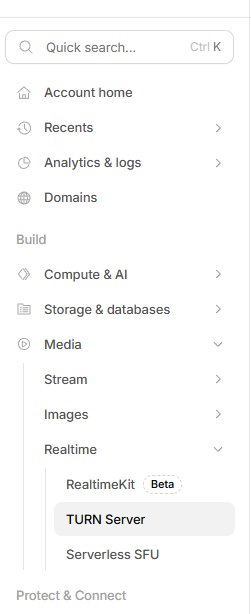
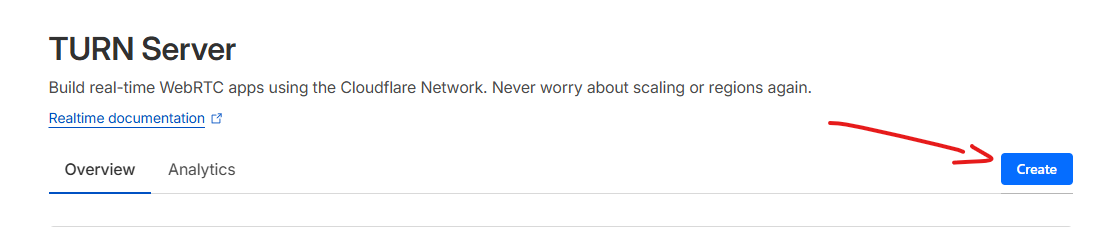
Open account in https://cloudflare.com and create a free turn server.
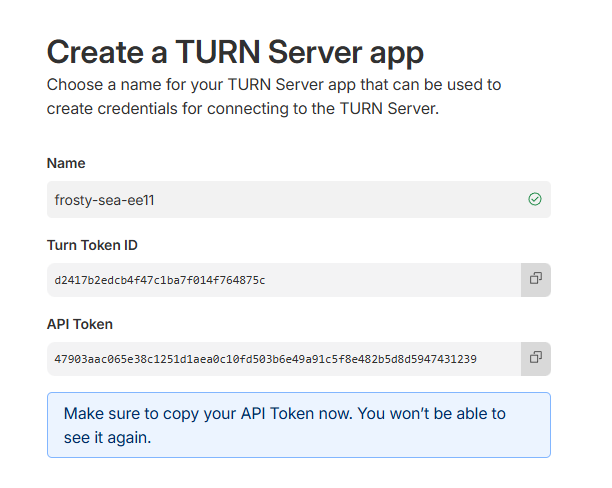
It will create an turn token id and api token, which you must save securely.
Add these tokens to api.json cloudflare_turn_keys
The admin menu will automaticaly generate the servers at runtime.
Full Documentation: https://developers.cloudflare.com/realtime/turn/
Manual self hosting (Best option if you have good VPS)
In this guide we will install Go and pion turn server
Requirements:
- Dedicated Windows or Linux VPS
- Golang→ All releases - The Go Programming Language
Golang installation
Windows
Go to All releases - The Go Programming Language
Download and install the correct build for your machine:
Examples:
- Windows (non arm): go1.25.5.windows-amd64.msi
Linux
Install command: sudo apt update && sudo apt -y install golang-go
Pion Turn server
After you install golang in your machine, we will download pion turn server
Download the source code from the latest release
Unzip the file
Open the terminal inside the folder (e.g. turn-4.1.3)
Navigate to turn-server folder inside examples
cd examples/turn-server
Build the simple folder into a executable
go build ./simple
Start your turn server with the following configuration (change the ip to your vps ip and change the username=password with something you choose e.g. luxu=gg
Windows
./simple.exe -port 3478 -public-ip YOUR_SERVER_IP -users luxu=ggLinux
./simple -port 3478 -public-ip YOUR_SERVER_IP -users luxu=ggYour Turn server should now be available to use in any resource you want!
(Optional) Make a .bat file to easily restart your server e.g.
- Configure the following script
@echo off
cd /d "path\to\your\folder"
echo Turn server started!
simple.exe -port 3478 -public-ip YOUR_SERVER_IP -users username=password
pause